Spring break deal: 20% off any plan + free eSIM data. Offer ends in:
12
days
12
hours
12
minutes
12
seconds
google play store icongreen star ratings
1.43M Reviews

Get the fastest Android VPN app

Access your favorite content worldwide without restrictions
Ultra-fast VPN servers in 80+ global locations
Easy-to-use app for Android phones and tablets
Risk-free with a 30-day money-back guarantee
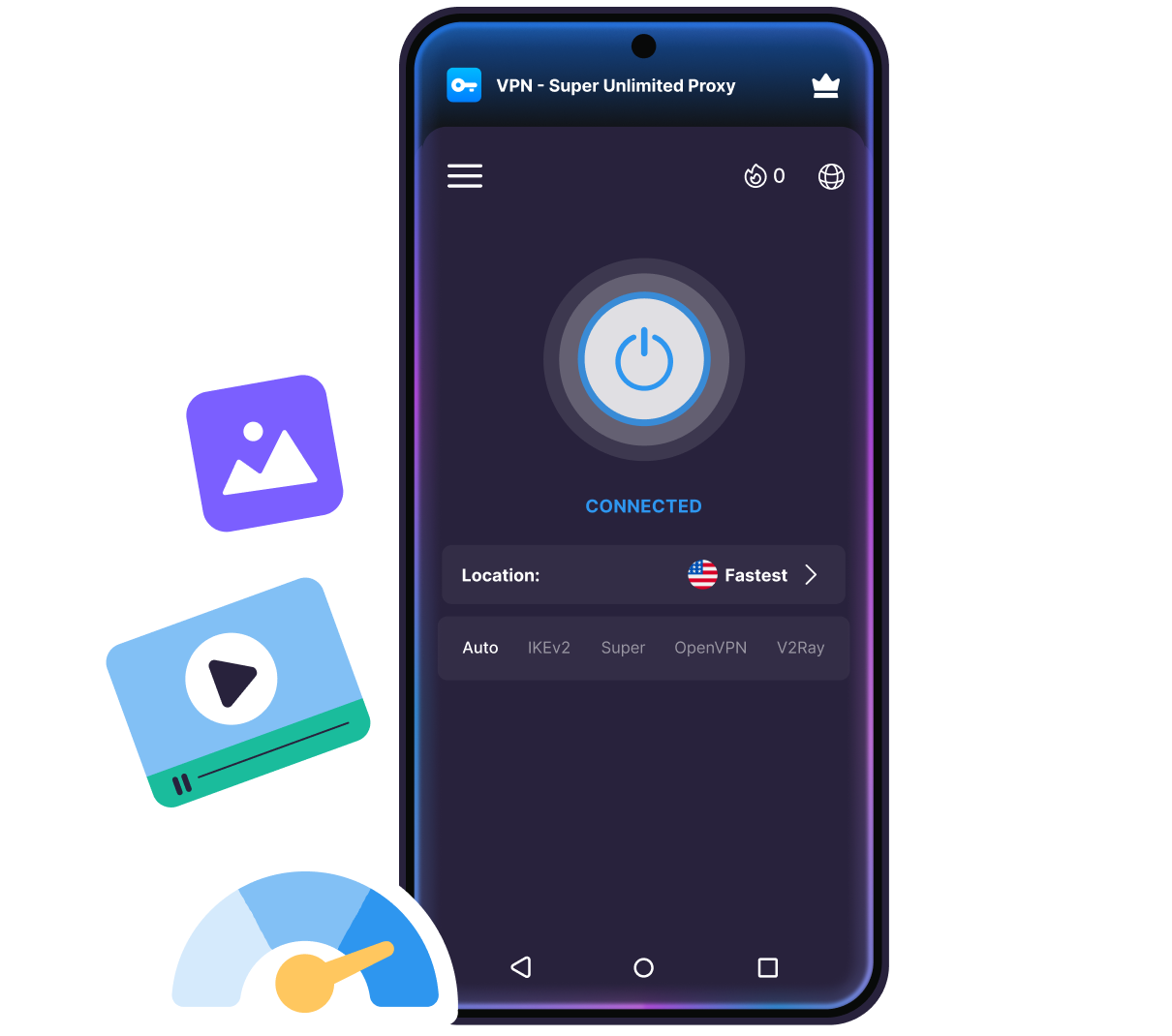
Android VPN

How to set up VPN Super on Android

1
Install the VPN
Download VPN Super from the Google Play Store to get started.   

Person standing beside phone with cloud download icon and installing progress bar on screen.
2
Sign in to Premium
Open VPN Super and sign in with your Premium account to unlock full access.
Person leaning on stacked servers with cloud sync icon above, checking phone.
3
Connect & browse
Choose a server, hit Connect, and browse fast, securely, and privately.
Enjoy VPN Super
Get VPN Super

Why use VPN Super for Android?

VPN Super encrypts your Android device's traffic and hides your IP, so your browsing, streaming, and downloads stay private on any network.

Optimized for Android

Enjoy fast and seamless streaming, gaming, and browsing with a VPN engineered forAndroid performance.
Stay protected with Always-On VPN
Protect your browsing on any network

Private browsing on any network

Your activity stays private on public Wi-Fi or cellular. Stay protected while browsing incafés, airports, and malls.

Access global content anywhere

Get past network and regional blocks and explore the internet with more freedom.
Appear to be anywhere in the world
Zero activity logs

Zero activity logs

We never track your activity, and we keep no records of what you do online.

Built for streaming

VPN Super's Premium servers are optimized to work with popular services.
Stream in HD on mobile
Get a VPN on everything

VPN on everything

Cover up to 10 devices—your phone, tablet, PC, & TV—under one subscription.

Get the fastest VPN for Android

Streaming-optimized servers illustration

Fastest location in one tap

VPN Super's Fastest Location picks the quickest servers for you — right from thehome screen or server list.
80+ global locations illustration

Advanced VPN protocols

VPN Super auto-selects between Super, IKEv2, OpenVPN, and V2Ray, so youconnect fast without picking a protocol.
Up to 10 devices illustration

In-app latency info

VPN Super auto-selects between Super, IKEv2, OpenVPN, and V2Ray, so youconnect fast without picking a protocol.
Up to 10 devices illustration

Split tunneling

Choose which apps use the VPN and which connect directly—only on the VPN Super app for Android.
Up to 10 devices illustration

Kill Switch protection

VPN Super’s Kill Switch blocks your internet if your VPN connection drops, so your IP and data stay protected.
Up to 10 devices illustration

Home-screen widget

Connect or disconnect right from your Android home screen for seamless protection.

Get VPN Super

VPN Super for Android

VPN Super works across Android phones and tablets running Android 8.0 (Oreo) or later.
  • Samsung Galaxy (S8 to S24 series, Fold, Flip)
  • Google Pixel (3 to 8 Pro)
  • OnePlus, Xiaomi, Vivo, Oppo, Motorola
  • Works with custom ROMs & rooted devices
Get VPN Super
Illustration showing a TV with a connected Apple TV remote, gear icons, and decorative shapes representing how a VPN works on Apple TV

Why people trust VPN Super

It is a great app especially in my country where I can connect to different server which works properly.
Zaneillio Campbell
April 2026
VPN Super delivers exactly what it promises. The connection is stable and the interface is very user-friendly.
Ahmad Khan
February 2026
Great VPN app! Fast connection, easy to use, and works very well.
Abdulkarim Abubakar
February 2026

Frequently Asked Questions

faq
How do I enable VPN Super on Android?
Download VPN Super from the Google Play Store, open the app, and tap Connect. Android will ask permission to add VPN configurations—allow permission, and you're protected in seconds.
Is there a free VPN for Android?
Yes. VPN Super's free tier covers 20+ locations with encrypted browsing and unlimited bandwidth. Premium unlocks the full network of streaming-optimized servers in 80+ locations.
Does VPN Super have a Kill Switch on Android?
Yes, if your connection drops, VPN Super tries to reconnect automatically first. If reconnection fails, all internet traffic is blocked until the VPN is restored so your data and activity stay protected. Kill Switch works across all protocols and is disabled by default until you turn it on in Settings.
What is Split Tunneling and how do I use it on Android?
Split Tunneling lets you choose which apps use the VPN and which connect directly to the internet. It's app-based and only available on the VPN Super app for Android—turn it on in the app menu (☰) > Settings and pick which apps to route through the VPN tunnel.
Does VPN Super have a built-in Private Browser?
Yes. The Android app includes a Private Browser tab that doesn't keep history, giving you a second layer of privacy without leaving VPN Super.
What's the VPN Super home-screen widget?
It's a widget you can add to your Android home screen to connect or disconnect VPN Super and see your connection status, all without opening the VPN Super app.
Which VPN protocol should I use on Android?
We recommend using Auto. VPN Super will automatically select the best protocol for your network across four options: Super, IKEv2, OpenVPN, and V2Ray. Super and V2Ray are generally recommended for restrictive networks or heavily censored regions; IKEv2 handles switching between Wi-Fi and mobile data smoothly; OpenVPN is a reliable and widely compatible option. Advanced users can pick a protocol manually on the app home screen.
Which Android devices are supported?
VPN Super works on Android phones and tablets running Android 8.0 (Oreo) or later, including Samsung Galaxy, Google Pixel, OnePlus, Xiaomi, Vivo, Oppo, and Motorola devices.
Is VPN Super safe for Android?
VPN Super encrypts your connection with modern, industry-standard encryption and doesn't keep activity logs, so your browsing, streaming, and download history stay private.
Can I use VPN Super on multiple Android devices with one account?
Yes. A Premium subscription covers up to 10 devices at once, across Android, iOS, Windows, Apple TV, and Android TV.

Try VPN Super risk-free

We're confident you'll love the speed, security, and freedom VPN Super gives you. But if you're not completely satisfied, no worries—just reach out within 30 days and we'll give you a full refund. No hassle. No questions asked. Total peace of mind.


Get VPN Super
Apple TV with Siri Remote on dark background

30 day money back guarantee