

🚀 TL;DR: The Quick Summary
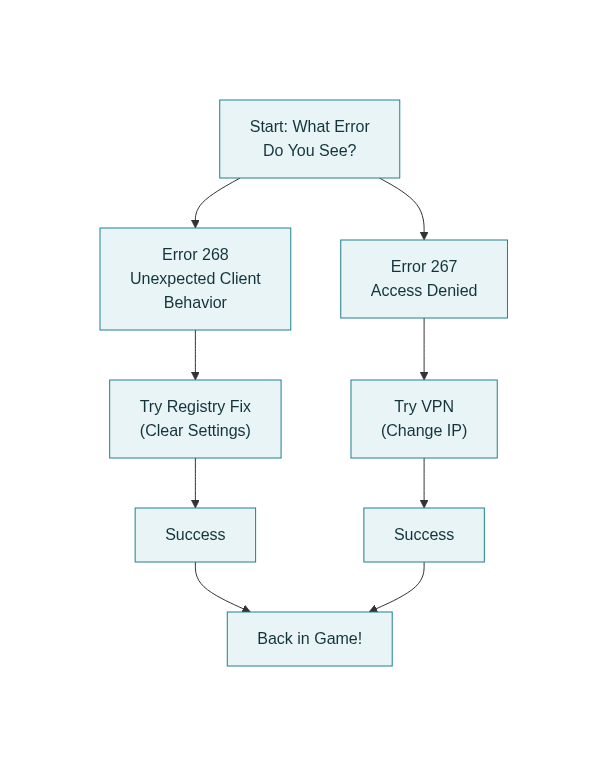
- Error 268 is often a local "telemetry flag" on your PC, not a server ban.
- HWID Bans target your computer's hardware ID, meaning a simple IP change won't work alone.
- The Fixes: We recommend a specific Registry Wipe for Error 268 and using a high-quality VPN to bypass IP blocks.
You know the feeling. You settle in for a session of Blox Fruits or Doors, ready to grind with your friends. But instead of the lobby, you’re hit with a grey screen and a cold message: "You have been kicked due to unexpected client behavior" or the dreaded "Access Denied."
You haven’t been toxic. You haven’t been scripting. But you are locked out.
Most guides will tell you to "restart your router" or "clear your cookies." If you’re reading this, you’ve probably already tried those basic fixes, and they didn’t work. That’s because Roblox’s moderation system has evolved. It’s no longer just a simple door you can knock down; it’s a complex security grid involving Hyperion (often called Byfron) anti-cheat, Hardware IDs, and Registry "breadcrumbs".
We've tested these methods on the latest 2025 patch to ensure they work. This isn't just another "how-to." This is a deep dive into the "man behind the curtain" of Roblox moderation—and the specific, technical steps you need to take to get back in the game.
What is a Roblox IP Ban?
A Roblox IP Ban is a network-level restriction that blocks your specific internet connection from accessing the game servers. Unlike a regular account ban, this prevents any account—even brand new ones—from logging in while connected to your Wi-Fi. These bans typically last from 1 to 7 days, though severe violations can result in permanent blocks.
The Hard Truth: It Might Not Just Be an IP Ban
To fix the problem, we first have to diagnose it correctly. Roblox uses a tiered system to stop repeat offenders. If a standard VPN isn't working for you, you are likely caught in one of these deeper traps:
The Hardware ID (HWID) vs. MAC Address Reality
Many outdated guides suggest "spoofing your MAC address." This is bad advice. Roblox doesn't rely heavily on MAC addresses because they are too easy to fake.
- The Real Trap: Roblox tracks specific hardware identifiers, such as your Disk Volume Serial Number or Motherboard ID. If you have an HWID ban, changing your IP won't help because Roblox recognizes the computer itself.
- The Mobile "IDFV" Trap: On iOS, Roblox tracks the IDFV (Identifier for Vendors); on Android, it's the SSAID. A simple reinstall won't wipe these IDs. You often need to factory reset the device or wait out the ban timer (usually 1-7 days).
CGNAT & The "Innocent Bystander" Problem
Why were you banned for doing nothing? Blame CGNAT (Carrier-Grade NAT).
- The Reality: Most ISPs (especially mobile data providers) force thousands of customers to share a single public IP address. If one stranger on your ISP gets banned for exploiting, the entire IP gets blacklisted. You are effectively "guilty by association."
- The Fix: A VPN is often the only way to tunnel out of this shared, tainted network.
The "Tainted" Account Theory
Ever been banned for something you did weeks ago? The community often refers to this as a "Tainted" status.
How it Works: Note: Roblox does not officially use the term 'Tainted', but community analysis of ban waves strongly suggests this pattern. Veteran exploiters report that the anti-cheat often flags an account immediately but delays the actual ban until a massive "Ban Wave" occurs. This creates confusion, making you think your current activity caused the ban, when it was actually triggered days or weeks prior.
Deep Dive into Error 268 & The Telemetry Trigger
Error 268 is rarely a server issue. It is almost always a local telemetry flag triggered by the Hyperion (Byfron) 64-bit anti-cheat running on your PC.
The "Innocent" Apps That Flag You
Hyperion is aggressive. It scans for software that looks like cheat tools. Common false-positive triggers include:
- High-Polling Mice: Users with 8000Hz mice (like the Razer Viper V3) have reported significant performance issues and disconnects. While not confirmed as a direct ban trigger, the flood of input data can cause instability that mimics "unexpected client behavior." We recommend dialing it down to 1000Hz to be safe.
- Discord Overlay: In 2025, the Discord Game Overlay is a frequently cited cause of Error 268. Disable it entirely for Roblox settings.
- The "Alt-Tab" Risk: Aggressively Alt-Tabbing in Fullscreen mode can desync the client, causing the anti-cheat to panic and kick you.
The Expert Fix: Flushing Registry "Breadcrumbs"
Reinstalling often fails because Roblox leaves hidden keys in your Windows Registry. Follow these steps to clear them:
⚠️ Technical Step: Please follow these instructions carefully. Modifying the registry can affect your system settings.
- Perform a "Clean Boot"
Disable all non-Microsoft services inmsconfigto isolate if a background app (like an RGB controller) is the culprit. - The Registry Wipe
- Press Windows + R on your keyboard.
- Type
regeditand hit Enter. - Navigate to this exact path:
Computer\HKEY_CURRENT_USER\Software\Roblox - Deleting these keys removes old configuration flags that survive a normal uninstall.
How to Bypass a Roblox IP Ban (The Right Way)
If you are dealing with a network-level block (like Error 267), a VPN is your best tool—but you must use "Power Moves" to make it work properly.
1. The IPv6 Leak Fix
Your VPN might be masking your IPv4 address, but if your ISP uses IPv6, your real location could still be leaking.
🛠️ The Fix: Go to your Network Adapter settings in Windows and disable IPv6. This forces all traffic through the secure IPv4 tunnel provided by your VPN.
2. Avoid "User-Agent" Switching
Do not use browser extensions that spoof your User-Agent string. Security systems check for mismatches between your reported browser (e.g., "Chrome") and its actual rendering capabilities. If they don't match, you could be flagged as a bot.
The "Shadow Ban" Checklist
Not sure if you're banned? Run these 3 simple tests:
- Chat Test: Can friends see your messages? (Shadow-banned players talk to a void).
- Private Server: Can you join a VIP server? (Often blocked for shadow-banned users).
- Display Name: Does your name appear as "Roblox" or "[Unknown]" to others?
The Last Resort: How to Appeal Like a Pro
If you are innocent, you need to speak the language of the support team.
The "Ticket Escalation" Secret:
If your first appeal is rejected by a bot (standard procedure), reply immediately requesting a "Human Review."
- Show You're Real: Mention that you use Hardware 2FA (like an Authenticator App). In many online security systems, this distinguishes legitimate users from disposable bot accounts.
- Keywords to Use: Explicitly mention "False Positive," "Byfron Telemetry," and "Packet Loss" to show you understand the technical side.
Conclusion: Post-Unban Hygiene (Day 1 Checklist)
You're back in? Great. Don't blow it.
- Browser Hygiene: Use a privacy-focused browser like Brave to avoid "Canvas Fingerprinting."
- New Credentials: If you made a new account, use a fresh email. Do not link your old phone number.
- Stay on VPN: Keep your VPN connected for at least 24 hours to "warm up" your new session before trying to play on your home connection again.
Use a high-quality tool like VPN Super to ensure your connection is encrypted and stable. We manage our server IPs carefully to minimize "bad neighbors," giving you the best shot at getting back to BedWars or Bloxburg without the headache.


 VPN for Windows
 VPN for Android
 VPN for iOS
 VPN for MacOS
 Apple TV
 Android TV