Uganda Election Internet Shutdown: Social Media Blocks Persist (2026)
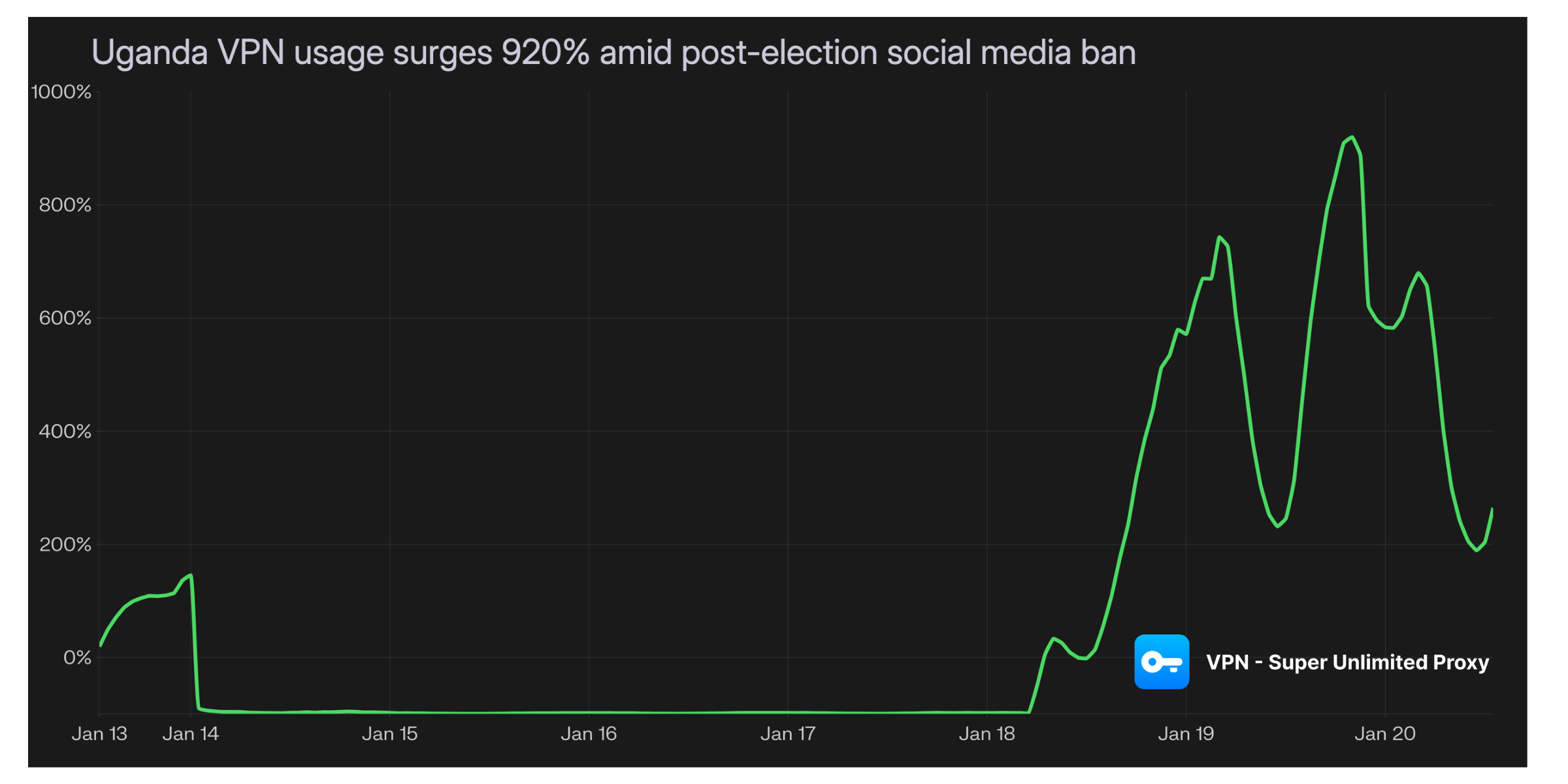
When the lights came back on after Uganda’s election blackout, social media remained in the dark. We recorded a 920% surge in VPN usage as citizens immediately turned to privacy tools to bypass continuing government blockades on WhatsApp, TikTok, and X, proving that while connectivity was restored, digital freedom was not.
Censorship
Privacy
VPN Super
January 21, 2026
Share:
Table of Contents
Uganda imposed a nationwide internet shutdown two days before its Jan 15, 2026 general election after the Uganda Communications Commission (UCC) ordered operators to suspend public internet access.While connectivity was partially restored by January 19, access to major social media and messaging platforms remained restricted, driving a massive spike in VPN demand as citizens sought to reconnect. Similar restrictions could happen again. Anywhere, anytime.
Date implemented:
Jan 13, 2026 (internet shutdown ordered); partial restoration reported Jan 18–19, 2026
Platforms affected:
Internet access nationwide (initially); ongoing restrictions for X, TikTok, Instagram, WhatsApp, and Telegram; Facebook remains banned
Censorship method:
UCC directive to suspend public internet access; followed by specific filtering of social platforms upon restoration
Reason cited:
Authorities cited concerns about misinformation, electoral fraud, and national security during the election period
Election context:
General election held Jan 15, 2026
VPN surge:
+920% above baseline on January 19, 2026
How the disruption was measured
Internal App telemetry
Our anonymized data recorded a 920% increase in VPN traffic from Uganda compared to the pre-election baseline.
Timeline: Traffic remained flat during the total blackout (Jan 13–18). The surge began immediately as general connectivity was restored on January 18, peaking on January 19 at approximately 20:00 local time.
Analysis: This pattern is consistent with users regaining basic internet access but finding specific apps (like WhatsApp and X) still blocked, necessitating a VPN to bypass the remaining filters.
Independent network measurement
Third-party monitoring confirmed a widespread shutdown beginning Jan 13, 2026, following a UCC directive. After general connectivity returned, tests indicated that restrictions persisted for social media and messaging platforms, validating the driver behind the VPN surge.
Chain of events
Before election week: Rights groups warned against potential election-period restrictions as political tensions rose.
Jan 13, 2026 (18:00): The UCC ordered an internet shutdown, suspending internet services and selected mobile money services "until further notice."
Jan 15, 2026: Uganda held its general election under a near-total information blackout.
Jan 18–19, 2026: Internet connectivity was partially restored. However, users immediately reported that social media apps remained inaccessible without circumvention tools.
What remained restricted
As of the partial restoration on Jan 19, monitoring indicated continued blocking of X, TikTok, Instagram, WhatsApp, and Telegram. Additionally, Facebook has reportedly remained banned in Uganda since the 2021 elections.
The Reality Check
When governments flip the switch on your favorite apps, you're suddenly:
Cut off from family and friends abroad
Unable to run your business or side hustle
Missing out on news, entertainment, and connection
Stuck with whatever the government allows
Your internet freedom shouldn't depend on politics.
Your Way Around It: VPN Super Unlimited Proxy
Here's how you stay connected, no matter what:
Quick setup (takes 2 minutes)
To regain access to social media immediately, you can download our VPN for any device.
If you’re in Uganda and facing ongoing restrictions, you can help document the censorship:
Submit anonymous evidence: Share screenshots of error messages and your ISP/region details.
Run a test: Use OONI Probe to measure which websites and apps are specifically blocked on your network.
Together, censorship can be mapped and fought.
Censorship
Privacy
Share:
VPN Super
VPN Super is dedicated to your online security and privacy. Posts from this account will focus on company news or significant privacy and security stories.




 VPN for Windows
 VPN for Android
 VPN for iOS
 VPN for MacOS
 Apple TV
 Android TV